Minutes: AI Meeting Note Taker
- 4.1
- Rating
- 100.00K
- Installs
- Free
- Price

 Analysis by App-foxy
I usually approach meeting transcription apps with some skepticism. The first recording can feel impressive, but the real test comes later: does the app still save time when meetings become routine, or does it create another pile of text to manage? Minutes: AI Meeting Note Taker is aimed at that exact problem. It is a free productivity app from Minutes AI that records voice audio and turns spoken discussions into written material. After using it, I see a useful tool for people who regularly need to remember what was said, though its lasting value depends heavily on whether you build a simple review habit around it.
The appeal is easy to understand. Instead of trying to write everything down while listening, I can give more attention to the conversation and return to the recording or transcript afterward. That is especially helpful when a meeting moves quickly, includes several topics, or contains details that are easy to lose in handwritten notes. The app has a 4.1 average from around 3,100 ratings, with more than 100,000 installs, so it has already attracted a meaningful audience without feeling like an obscure experiment.
From first-week curiosity to a useful routine
During the first week, the strongest benefit is not that Minutes replaces every form of note-taking. It is that it changes what I concentrate on during a conversation. Normally, I have to choose between listening carefully and capturing exact wording. With a voice recorder and transcription tool available, I can make a quick audio record and use the written result as a memory aid later.
You May Also Like

 Blood Strike: 2.5 Anniversary
Blood Strike’s Loadouts Turn Every Drop Into a Tactical Gamble
A close look at Blood Strike’s custom loadouts: how fast access to signature weapons reshapes its battle royale rhythm, rewards preparation, and narrows the gap between fights.

 Pandora - Music & Podcasts
Pandora’s Music Is Easy to Start, but Harder to Recover
Pandora’s strength is its low-effort path from a seed to a station. Its weak spot is how much confidence it asks you to place in connection, setup, and quiet recovery.

 8 Ball Pool
 Is Built on Rivalries, Rematches, and Routine
A close look at the rivalries, rematches, shared routines, and unanswered safety questions that turn a quick pool match into a persistent mobile community.

 Samsung Music
’s Quiet Strength Is Playing What You Already Own
Its reach comes less from spectacle than from dependable access to a personal library. That simplicity is both the app’s strongest retention engine and its ceiling.

 AccuWeather: Weather Radar
AccuWeather Review: A Quick, Clear Forecast for Everyday Decisions
For everyday plans, the best forecast is the one you can understand quickly. AccuWeather makes rain timing, radar, and local conditions easy to act on, with a few trade-offs.

 Hill Climb Racing
Why Hill Climb Racing Still Turns Crashes Into One More Run
A tiny car, a bumpy hill and one more upgrade: Hill Climb Racing keeps resurfacing because its simple chaos makes every near-miss feel personal.
More From Our News Desk
View All News


That distinction matters. I would not treat an automatically produced transcript as a perfect official record. I would treat it as a searchable starting point for reconstructing the important parts of a discussion. Names, specialist terms, overlapping voices, background noise, and unclear speech can all make a transcript less dependable than the original audio. The practical workflow is therefore simple: record, review the written output, listen back to uncertain sections, and turn the useful parts into my own final notes.
For a first-week test, I would use it in three different situations rather than judging it from one short recording. A quiet one-to-one conversation shows how comfortable the basic process feels. A longer team discussion reveals whether the app remains useful when topics change. A personal voice memo tests whether it can fit into everyday planning rather than being limited to formal meetings. This approach gives a better sense of whether the app belongs in a routine.
The app is particularly appealing to people who already record ideas but rarely revisit them. Audio alone is easy to forget because it requires uninterrupted listening. A transcript gives me something I can scan, copy into another note, or use to locate the part of a conversation that matters. That makes the product more practical than a conventional recorder when the goal is not merely to preserve sound, but to recover information from it later.
There is also a useful psychological advantage during meetings. I can stop trying to write down every sentence and instead capture only decisions, questions, and follow-up tasks by hand. The recording and transcript provide a safety net, while my short notes preserve the context that automated text may not understand. In my experience, that combination is better than relying exclusively on either a transcript or handwritten notes.
A realistic workday example
Imagine a project discussion in the afternoon. Several people talk through a change in priorities, mention a few names, and agree to revisit one unresolved issue. I start a recording in Minutes, keep a short handwritten list of decisions, and return to the result afterward. Rather than replaying the whole conversation, I scan the transcript for the section where the unresolved issue was discussed. I then check the corresponding audio, correct any wording that looks uncertain, and write a concise follow-up message.
That workflow is where the application earns its place. The recording is not the finished product. The value comes from reducing the time between “I remember that we discussed something” and “I can find the exact part and act on it.” If I simply record everything and never review it, the app becomes a storage drawer. If I use it to support a follow-up habit, it becomes much more useful.
For students, freelancers, interviewers, researchers, and people who attend frequent calls, this can be a meaningful improvement. It can also help anyone who finds simultaneous listening and writing tiring. However, I would be careful in sensitive conversations. Before recording other people, I would make sure everyone involved is comfortable and that recording is appropriate in the situation. The app makes capturing audio convenient, but convenience does not remove the need for good judgement.
Where it fits beside ordinary alternatives
A standard voice recorder is simpler when I only need an audio file and do not care about written text. It may also be preferable when I want the most direct possible recording workflow. A conventional notes app is better when I already know the key points and want complete control over wording, structure, and formatting. Minutes occupies the middle ground: it helps create a written reference from spoken material while preserving the original audio as a useful check.
That middle position is both its strength and its limitation. It saves effort at the beginning, but it does not eliminate the need for judgement at the end. People looking for polished, publication-ready meeting minutes without any editing may be disappointed. People who want a quick bridge from conversation to usable notes are more likely to appreciate it.
What remains valuable after the novelty fades
The first few uses can feel more exciting than the tenth. Any app that turns speech into text has a visible “wow” moment, but lasting value comes from repetition. For me, Minutes has a chance to remain useful when it is attached to a recurring event: a weekly planning meeting, a regular class, a series of interviews, or a daily voice-reflection habit. The more predictable the use case, the easier it is to remember to start a recording and review the result.
I would not open it for every casual conversation. That would create too much material and make the review stage feel like unpaid administration. Instead, I would reserve it for discussions where forgetting a detail has a real cost. This selective approach is important because transcription is only helpful when the information will be used. Recording everything can produce the illusion of productivity while leaving the actual follow-up untouched.
A strong long-term habit is to connect every recording with one concrete action. After reviewing a meeting, I might extract a deadline, draft a question, update a task, or send a short recap. If there is no action, I can decide that the recording is merely archival and move on. This prevents the transcript from becoming another inbox that I feel obligated to clear.
Another practical habit is to name or organize recordings consistently, if the app’s available workflow supports that comfortably. A title based on the date, subject, and participants is more useful than a vague label. I would also avoid keeping multiple versions of the same notes unless there is a clear reason. The app is most valuable when it shortens retrieval time, not when it encourages me to accumulate more material.
The free price makes experimentation easy. I can test whether the recording and transcription process actually fits my day before deciding whether advanced or continued use justifies spending more. In-app purchases range from $14.99 to $99.99 per item, so I would think carefully before paying. The right question is not whether transcription is impressive, but whether the hours saved through repeated use outweigh the cost for my particular workload.
That pricing range also makes usage discipline more important. Someone who records only once every few months may not get enough recurring value from a paid option. Someone who regularly handles interviews, consultations, or meetings may find the calculation different. I would first measure my own behavior informally: how often do I record, how often do I review, and how often does the result lead to a useful action? Those answers matter more than the novelty of the first transcript.
The maintenance burden is mostly human
Minutes does not remove the maintenance work surrounding information. I still need to start the recording, choose when it is appropriate, check important passages, and decide what deserves to be kept. That is not a flaw unique to this app; it is the unavoidable cost of turning spoken conversation into dependable knowledge. The app lowers the capture barrier, but it cannot decide which parts of a discussion matter to me.
The most sustainable routine I found is a short review immediately after a meeting. Waiting several days makes the conversation harder to remember and increases the temptation to ignore the transcript. A quick pass while the context is fresh lets me correct obvious mistakes and extract the next steps before they disappear into the rest of the day.
I would also avoid treating the transcript as a replacement for personal context. A sentence can be technically accurate and still fail to explain why a decision was made. My own brief notes should include the purpose of the meeting, the decision, the owner of each task, and any uncertainty. Minutes can support those notes, but it should not be expected to supply all of that structure automatically.
Storage and attention are other maintenance concerns. A growing collection of recordings may become difficult to navigate, and listening back to every file is not realistic. I would keep only material that has a continuing purpose, or at least mark important recordings clearly. The less clutter I create, the more likely I am to trust the app when I need to find something quickly.
The current version is 1.4.0 and it runs on Android 7.0 or later, which makes it accessible to people using older compatible devices. The app is rated for Everyone, and that broad age classification makes it approachable for general productivity use. Still, suitability is not only about age. A workplace, school, or client may have its own rules about recording conversations, so I would consider those rules before making the app part of a shared workflow.
Why fatigue can appear over time
The main source of fatigue is the gap between capture and completion. Starting a recording feels productive immediately, while reviewing it requires deliberate effort. If I repeatedly postpone that second step, I end up with a collection of audio and text that increases mental load instead of reducing it. This is why I would use Minutes for high-value conversations rather than as a default recorder for the entire day.
Another possible frustration is the need to verify important details. Automatic transcription is convenient, but I would not copy a sensitive name, number, commitment, or technical instruction without checking it against the audio. That extra verification is a small task for a short meeting, but it can become tiring with long recordings. Users who need perfectly precise records may prefer a human note-taker or a carefully edited manual document.
There is also a social dimension. Some people may speak differently when they know a conversation is being recorded, and not every meeting benefits from that atmosphere. I would be especially cautious in personal conversations, confidential work, or discussions involving people who are uncomfortable with recording. The app is a tool for agreed-upon documentation, not a reason to capture every exchange.
People who dislike reviewing text may not enjoy the full workflow either. If I prefer writing concise notes while listening and never want to revisit a transcript, a normal notes app may be faster and less distracting. Likewise, if my meetings are already highly structured and produce clear written agendas and action lists, Minutes may add more material than value.
On the other hand, users with attention difficulties, language barriers, memory concerns, or demanding listening environments may find the extra reference especially helpful. The ability to return to spoken material can reduce the pressure to understand and record everything at once. I would still use personal summaries for clarity, but the app can provide reassurance that an important detail is not lost after the conversation ends.
Who should build a habit around it?
I think Minutes is best for people whose work repeatedly depends on spoken information. A freelancer discussing a client brief, a student reviewing a lecture, or a manager preparing a follow-up can all benefit when the recording leads to a specific next step. The application is less compelling for someone who rarely attends meetings or already has a reliable manual system that takes little effort.
It is also a better fit for people willing to review selectively. The ideal user does not expect the app to organize an entire life automatically. Instead, that person uses it as a capture layer, checks the important sections, and transfers only the decisions or tasks that deserve a permanent place elsewhere. That modest expectation makes the experience more dependable.
Before committing to it, I would run a small personal trial using the free version. I would record a few genuinely useful conversations, review the results on the same day, and note whether the process saved time or merely created more reading. I would then decide whether the app belongs in a regular routine. This test is more revealing than judging it by transcription quality in isolation.
The developer, Minutes AI, has positioned the product around a clear everyday need rather than a broad collection of unrelated productivity tools. That focus is helpful because I know what to use it for: capturing spoken material and making it easier to revisit. The trade-off is that it should not be mistaken for a complete project-management system, a replacement for thoughtful meeting facilitation, or a universal note archive.
My long-term verdict
After the initial novelty fades, I can see Minutes: AI Meeting Note Taker earning lasting space for a specific kind of user. Its strongest quality is the bridge it creates between spoken conversation and usable written reference. It can make meetings less demanding in the moment and make follow-up easier afterward, provided I am prepared to review and edit what it produces.
I would recommend trying it if you often leave conversations thinking, “I know we covered that, but I cannot remember exactly what was said.” I would not recommend adopting it indiscriminately for every interaction. The best results come from selective recording, immediate review, and a clear action attached to each useful transcript.
For a free productivity app with an Everyone age rating and a straightforward purpose, it is easy to test without much commitment. The paid options deserve a more careful decision because recurring value depends on how frequently the app becomes part of real work. My own conclusion is positive but measured: Minutes is worth keeping when it supports a repeatable review habit, not when it is used as a passive bucket for recordings.
If you want a simple audio archive, a conventional recorder may be the cleaner choice. If you need fully controlled, polished minutes, manual notes or a dedicated collaboration system may suit you better. But if you want help turning important conversations into something you can revisit and act on, Minutes: AI Meeting Note Taker has a practical role. Its lasting value is not in transcribing everything; it is in helping me remember the right things and do something with them.
FAQs for Minutes: AI Meeting Note Taker
01What is Minutes: AI Meeting Note Taker, and how does it work?
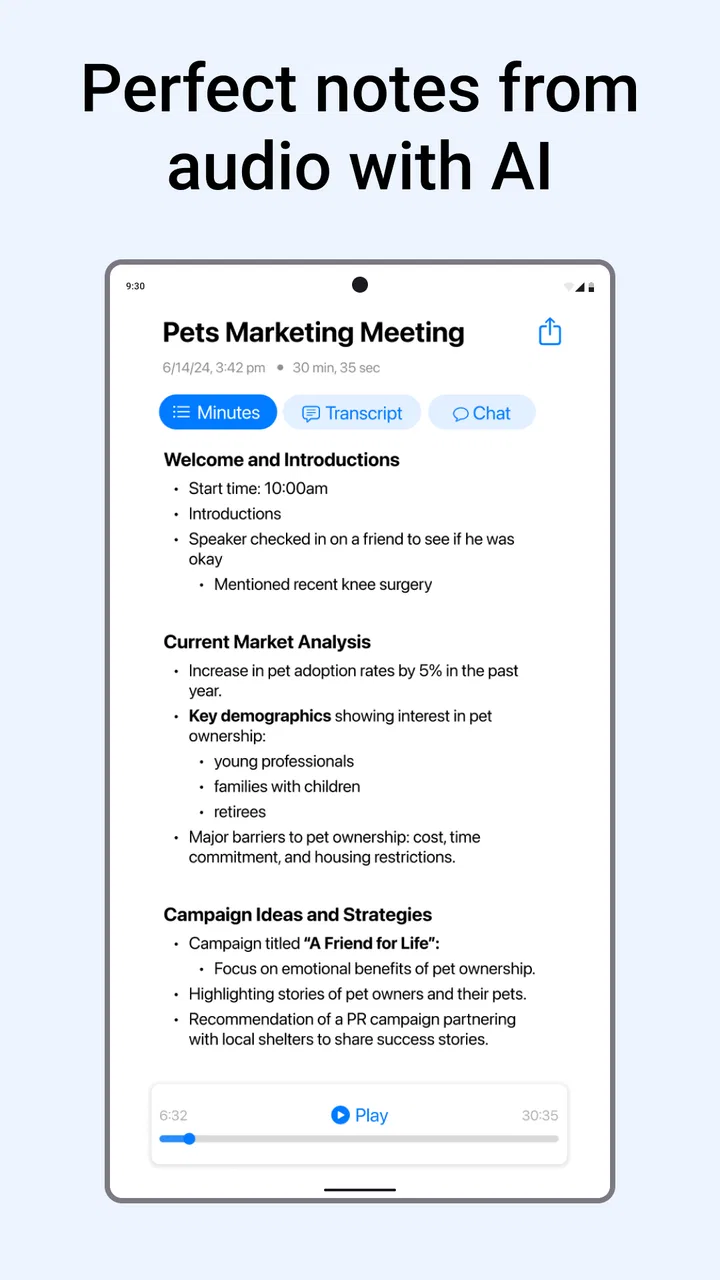
Minutes: AI Meeting Note Taker is designed to record meetings and turn spoken conversations into organized notes. After starting a session, the app listens to the discussion and uses artificial intelligence to create a transcript, summarize the main points, and identify useful details such as decisions, tasks, or follow-up items. The exact results can vary depending on audio quality, speaker clarity, and the language being used.
02Does Minutes: AI Meeting Note Taker record and transcribe meetings automatically?
The app generally requires you to begin a recording or meeting session before it can capture audio. Once activated, it processes the conversation and produces a written transcript or AI-generated summary. Before using it in a workplace, classroom, interview, or personal conversation, make sure everyone involved understands that recording is taking place. Local privacy and consent laws may require permission from all participants.
03Can Minutes: AI Meeting Note Taker identify action items and important decisions?
One of the most useful features is its ability to reduce a long conversation into practical information. Depending on the meeting and the app version, the generated notes may highlight key topics, decisions, questions, deadlines, and assigned tasks. However, AI summaries are not always perfect. You should review the final notes carefully, especially when names, dates, figures, technical terms, or responsibilities are important.
04Is Minutes: AI Meeting Note Taker free to use?
Availability and pricing can depend on the platform, region, and current subscription plan. The app may provide limited free functionality, a trial period, or restrictions on recording time, summaries, exports, and storage. Premium features can require a recurring subscription or in-app purchase. Check the current listing and pricing details before downloading, and confirm whether a trial automatically changes into a paid plan.
05Is my meeting audio and personal information safe in Minutes: AI Meeting Note Taker?
Because the app handles recordings, transcripts, and potentially sensitive business or personal discussions, privacy should be considered before regular use. Review its privacy policy to understand how audio and notes are uploaded, processed, stored, shared, or deleted. Avoid recording confidential conversations unless you have authorization, and use available account-security options such as strong passwords, device protection, and careful sharing settings.
Pros
- Creates concise meeting summaries in minutes.
- Helps identify key decisions and action items.
- Search makes past meeting details easy to find.
- Useful for reviewing discussions without replaying recordings.
- Supports more organized follow-up after meetings.
Cons
- Transcription accuracy may drop with accents or background noise.
- Sensitive conversations may raise privacy and data concerns.
- AI summaries can miss context or misunderstand speakers.
- Some useful features may require a paid subscription.
- Processing meetings can use considerable battery and mobile data.

Minutes: AI Meeting Note Taker
Gallery